Where did this number come from?
A friend asked why her dashboard showed fewer orders than she had packed. The answer took me twenty minutes in R. whence, now on CRAN, lets the viewer of a Shiny dashboard click the number and see the answer for themselves.
It started with a box count.
A friend sells plants online. It is a small shop: she takes the photos, answers the emails, and packs every order herself. Last spring I built her a small Shiny dashboard over a weekend. It showed orders, revenue and the best sellers for each month.
A few weeks later she sent me a screenshot. The dashboard said 412 orders for April. Under it she had written: “I packed more than 600 boxes.”
The number was not wrong. I knew that before I looked. The pipeline under it removed test orders, then refunds, then orders that were never paid, and then it cut the month at midnight in UTC, not in her time zone. Each step was right. Together, they made a number that she did not recognise.
So I opened R and ran the pipeline one step at a time. I counted the rows after each step and wrote the counts in a message:
640 orders in April
598 after the test orders
431 after refunds and unpaid orders
412 after the cut at midnight UTC
She read it and replied: “OK, that makes sense. Can the dashboard tell me that?”
It could not. That question became whence.
The question every dashboard gets
Every dashboard I have built has met some version of it. Someone looks at a number and expects a different one. They do not doubt the arithmetic. They want to know what was left out.
The person who asks is usually not the person who wrote the code. They cannot read the pipeline. Even if they could, a row count is not in the code. It only exists when the code runs.
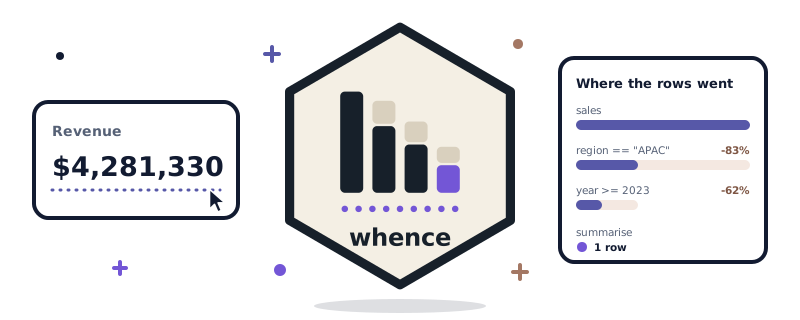
whence puts the answer next to the number. The viewer clicks it, and a panel opens:
$4,281,330

  Where the rows went
    sales                 18,442 rows
      region == "APAC"     3,180 rows   -15,262 rows (83%)
      year >= 2023         1,204 rows    -1,976 rows (62%)
      aggregated to 1 row      1 row

  Reproduce                                        [Copy]
    sales |>
      filter(region == "APAC") |>
      filter(year >= 2023) |>
      summarise(total = sum(revenue))

  [View the rows]
That is an attrition waterfall: each step, the rows that were left after it, and how many it removed. Under it is the code that makes the number again, with the values of the inputs filled in.
In the app, you change two function names and nothing else:
library(shiny)
library(dplyr)
library(whence)

ui <- fluidPage(
  selectInput("region", "Region", c("APAC", "EMEA")),
  whenceOutput("total", label = "Revenue")
)

server <- function(input, output, session) {
  output$total <- renderWhence(
    sales |>
      filter(region == input$region) |>
      filter(year >= 2023) |>
      summarise(total = sum(revenue)),
    format = scales::label_dollar()
  )
}
whenceOutput() and renderWhence() take the place of textOutput() and renderText(). The pipeline stays as it was. There are also versions for a summary table, where each row explains itself, and for a ‘ggplot2’ plot of one, where each bar does.
Like the grey boxes of bones, it looked like a small idea. Four parts of it were harder than they looked.
Problem one: the pipe leaves no trace
To count the rows after each step, whence has to find the steps. With the native pipe, that is harder than it sounds. The pipe is gone by the time R sees the code:
quote(x |> f() |> g())
#> g(f(x))
There is no list of steps, only calls inside calls. So whence knows a list of verbs, such as filter(), mutate(), summarise() and slice_max(). For a call to one of them, the first argument is the data from upstream. whence walks inward from the outer call until it reaches the source, and the steps fall out in order. The magrittr pipe %>% works the same way.
Each step then runs once, in order, in the environment of the render. It reads the same inputs as the whole expression would. That is the same work as running the pipeline in one piece.
Problem two: a summary is not a loss
This one is a question of meaning, not of code. summarise() turns 1,204 rows into one. A plain waterfall would say “-1,203 rows (99.9%)”.
That is true, and it is also wrong. No row was removed. They were all used. A viewer who reads “-99.9%” thinks the step threw almost everything away.
So a summary step is not shown as attrition. The waterfall says “aggregated to 1 row”, and the share is only shown for steps that drop rows.
Problem three: one row of a table
A table of revenue by region is a single pipeline that ends in group_by(region) |> summarise(...). A viewer clicks the APAC row. What should the waterfall show?
The easy answer is to run the pipeline again for APAC alone. That answer is wrong as soon as a step after the summary compares groups:
sales |>
  group_by(region) |>
  summarise(total = sum(revenue)) |>
  mutate(share = total / sum(total))
Run for APAC alone, share is always 100%.
So whence does not run the pipeline again for one group. It replays the steps of the whole table with a hidden id column, and reads the counts for the group from that. A step that compares groups keeps its true value. The code that it shows for a row is the code of the table, with one last filter() on the group.
Problem four: which rows
“View the rows” shows the rows of the source that make the value. A click on a removed count shows the rows that the step removed. In the story at the top, that is where the 167 refunds and unpaid orders would be.
This could be slow, so it happens only when the viewer asks. The steps then run again on a copy of the source with a hidden id column, and the ids that survive are the rows that count.
Some steps break that link. After distinct(), pivot_longer(), pivot_wider() or a step that whence does not know, a row of the result is no longer one row of the source. The panel then says so. The waterfall still works, because counts survive any step.
Try it
whence 0.1.0 is on CRAN:
install.packages("whence")

shiny::runApp(system.file("examples", "demo", package = "whence"))
The engine also works with no Shiny at all. whence_trace() takes a pipeline and returns the waterfall:
library(dplyr)

whence_trace(
  mtcars |>
    filter(cyl == 4) |>
    filter(mpg > 25) |>
    summarise(mean_hp = mean(hp))
)- Documentation: https://tenmeh.github.io/whence/
- Live demo, in your browser: https://tenmeh.github.io/whence/articles/live-demo.html
- Source: https://github.com/tenmeh/whence
My friend still opens her dashboard on the first of each month. These days, when a number looks low, she clicks it.